Reaction Time Test Online - Check Your Reflex Speed
How fast are your reflexes, really? You can get a solid answer in about a minute with an online reaction time test: wait for the signal, click as fast as you can, and read your result in milliseconds. We run the free [reaction time test](/) on Best Reaction Test, and this guide explains what that number actually measures, what counts as a good score, and how to test yourself under fair conditions.
Overview
You can check your reflex speed online in about a minute: open a reaction time test in your browser, click to start, wait for the screen to change color, and click the instant it does. Complete at least five rounds and read the median — that median, not your single best click, is your score. For a browser-based test, under roughly 250 ms is fast, 250–300 ms is a very typical range for healthy adults, and anything over 350 ms usually reflects fatigue, distraction, or device lag rather than ability, so retest before drawing conclusions.
We run the free reaction time test on Best Reaction Test, and this guide explains what that number actually measures, what counts as a good score, and how to test yourself under fair conditions. One thing up front: no online test measures pure biology. Your score always includes your device, your browser, and your state of mind on the day — which is why the right way to use these tests is to compare your own results over time, not to chase a single universal number.
What Is Reaction Time?
Reaction time is the interval between a stimulus appearing and your body responding to it. In the classic simple reaction time task, you watch for one signal — usually a color change on screen — and respond with one action, like a click. Behind that single click, your retina detects the change, your visual cortex processes it, your brain issues a motor command, and your finger carries it out.
In laboratory conditions with calibrated hardware, the mean simple visual reaction time across 1,469 adults was about 231 milliseconds in a widely used 2015 study by Woods and colleagues. Reaction time is not a fixed trait, though. It shifts with attention, age, sleep, and familiarity with the task — which is exactly why measuring it more than once matters.
You run this loop constantly without noticing it. A goalkeeper reacting to a penalty kick, a driver catching the brake lights ahead, an F1 driver launching the instant the starting lights go out — each is the same see-decide-act chain that an online test isolates and times. What separates elite performers is rarely a faster loop; it is reading earlier cues so the loop starts sooner.
How Online Reaction Time Tests Work
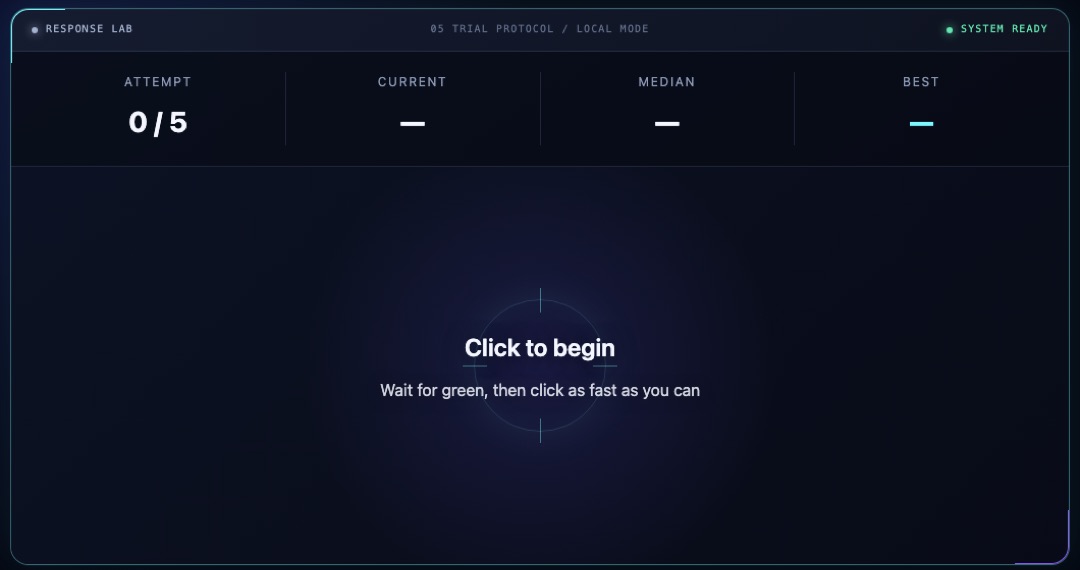
Most online tests follow the same simple protocol. You click to start, the screen changes color after a random delay, and you click or tap the moment you see the change. The timer reports the gap in milliseconds. The random delay is deliberate: it stops you from anticipating the signal, so each round measures a genuine response rather than a guess.
Our own test runs five rounds per session and reports the median, because one lucky click says very little about your actual reflexes. You can read the full details — how the timer works, why we use the median, and what hardware limits apply — on our methodology page.
- Click to start and wait for the color change.
- Respond as quickly as you can, without jumping early.
- Complete several rounds rather than stopping at one.
- Read the median, not just your best round.
What Is a Good Reaction Time?
There is no single number that separates fast people from slow people, because every testing protocol produces its own scale. The spread across published studies makes this obvious. The calibrated laboratory study mentioned above reported a 231 ms mean. A large computerized study by Vincent and colleagues, with more than 107,000 participants, reported 261 ms. A different computer protocol used by Deary and Der produced 328 ms in 1,930 adults. And a web-based sample of 10,060 people — the setup closest to what you are using right now — reported a median of 301 ms.
Age moves the needle too, but more gently than most people expect. In the Woods et al. data, observed mean reaction time rose gradually from roughly 218 ms in the youngest adult group to about 239 ms in the oldest. Wilkinson and Allison found a similar pattern of slow decade-by-decade change across 5,325 participants. You can explore these numbers in more detail on our average reaction time page.
For a browser-based test like ours, a practical reading looks like this:
- Under 250 ms: fast for an online test, where device delay is included.
- 250–300 ms: a very typical range for healthy adults.
- Over 350 ms: worth retesting under calmer conditions before reading anything into it.
Treat these bands as rough orientation, not diagnosis. If you want a deeper answer for your own score, our guide to what counts as a good reaction time goes further.
Skip the guesswork — measure it
Reading about reaction time only gets you so far. The five-round test takes about a minute and gives you a median score you can actually track.
Take the reaction time testWhy Online Scores Differ From Lab Numbers
If the lab average is around 231 ms, why does the web median sit closer to 300 ms? The gap is mostly hardware, not biology. A standard 60 Hz display only redraws every 16.7 milliseconds, so the signal can sit on screen for up to a full frame before you see it. Mouse, touchscreen, operating system, and browser each add a few more milliseconds of their own.
In other words, your online score is your biology plus your setup. That is why we never compare a browser result directly against lab-grade numbers, and why comparing your own laptop score against a friend's phone score tells you very little. Same person, same device, same conditions — that is the comparison that means something.
What Affects Your Reaction Time
Running this site, we see the same pattern again and again: people test once, get a mediocre number, and assume that is their permanent level. It usually is not. A handful of everyday factors move your score far more than raw talent:
- Sleep and fatigue — tired sessions are consistently slower sessions.
- Attention — notifications, background video, and noise all cost you milliseconds.
- Familiarity — your first rounds are partly spent learning the task itself.
- Anticipation — with practice you may start predicting the signal, which flatters your score without reflecting a genuine response.
- Age — the effect is real but gradual, measured in a few milliseconds per decade, not a cliff.
How To Get a Reliable Baseline
If you want to track yourself seriously, treat it like a small experiment. Use the same device and browser every time, sit in a quiet room, and complete at least five rounds per session. Record the median, and retest at a similar time of day so fatigue and daily rhythm do not confuse the comparison. Over a few weeks, the trend of your medians is far more informative than any single result.
If your goal is improvement rather than measurement, our reaction training guide covers structured practice in more depth.
Common Mistakes When Checking Your Reflex Speed Online
- Clicking before the signal appears. Anticipation flatters your score without measuring anything — any round under roughly 100 ms is a guess, not a response. If you catch yourself predicting the change, slow down mentally and wait for the actual signal.
- Switching between phone and computer, then comparing the numbers. Different screens and input hardware add different delays, so the two scores are different measurements. Pick one device and keep every comparison on it.
- Running dozens of rounds back to back. After a dozen or so rounds, attention drifts and times creep upward — you end up recording fatigue. One or two five-round sessions, read by the median, tell you far more than a marathon session.
A 5-Step Self-Check Before You Trust Your Score
- Confirm you are on the same device and browser you used for any scores you plan to compare against.
- Close notifications and background video, and sit somewhere quiet — attention is the cheapest performance upgrade there is.
- Complete the full five rounds instead of stopping at one good click.
- Check for any round under roughly 100 ms; that is anticipation, so rerun the session and wait for the real signal.
- Record the median and the time of day, and only compare it with medians taken under the same setup.
FAQ
What is the average human reaction time?
There is no single universal figure, because every protocol measures differently. Calibrated laboratory research puts simple visual reaction time near 231 ms, while a large web-based sample — closer to everyday online testing — reported a median of 301 ms. Your device and testing method are always part of the number.
Is a 250 ms reaction time good?
For a browser-based test, 250 ms is a solid result — at the faster end of the typical 250–300 ms range. Remember that online scores include device delay, so they are not directly comparable with lab figures.
Why is my second attempt faster than my first?
Part of the first attempt is spent learning the task: what the signal looks like and how the timing feels. After a few rounds you settle in, and later rounds better reflect your actual response speed. This is one reason we report the median of five rounds.
Can you improve your reaction time?
Practice reliably improves consistency and task-specific performance — you learn to stay focused and avoid wasted motion. Claims about permanently rewiring your baseline physiology are harder to support, so treat dramatic promises with caution.
Does it matter whether I test on a phone or a computer?
Yes. Touchscreens, display refresh rates, and input hardware all contribute to the final number. Pick one device and stick with it whenever you compare sessions.
How do I check my reflex speed online?
Open a reaction time test in your browser, click to start, and click again the instant the screen changes — that is the whole procedure. Complete at least five rounds and use the median as your score, because a single round mixes luck with measurement.
Is an online reaction time test accurate?
It is consistent rather than lab-accurate, and that distinction matters. Display refresh, input hardware, and browser latency are baked into every score, so an online result will not match calibrated laboratory equipment. The mitigation is simple: keep your device and conditions constant and track your median over time — the trend is reliable even when the absolute number is not.
Does sleep affect reaction time?
Yes, clearly — research by Van Dongen and colleagues showed that cumulative sleep restriction degrades sustained attention in a dose-dependent way, and tired sessions consistently test slower. If you are tracking your scores, note your sleep alongside them; most bad days have a mundane cause.
Can I trust a score under 100 ms?
No — on a browser test, a sub-100 ms result means you clicked before your brain could have processed the signal. Given display and input latency, genuine responses are simply not that fast online, so treat those rounds as false starts and ignore them.
Sources
- Woods et al. (2015): Factors influencing the latency of simple reaction time — calibrated simple visual reaction time in 1,469 adults.
- Hardy et al., web-based reaction time sample — median 301 ms across 10,060 online participants.
- Wilkinson and Allison (1989) — age-decade differences in 5,325 participants.
- Best Reaction Test methodology — how our timer, five-round median, and hardware-limit notes work.

Mikasa writes the timer code, reads the primary research, and checks every published claim against it — the same standard described in our editorial policy.
This article is educational, not medical or safety advice. Claims are reviewed against the linked sources and our editorial policy.
Launch the reaction time test
Five rounds, random delays, median score — run it on this device and start your own baseline today.
Start the five-round test